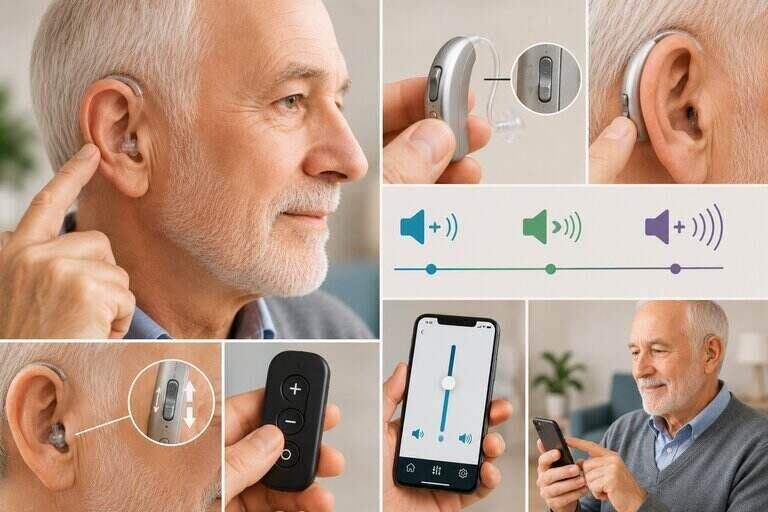
Knowing how to adjust hearing aid volume is one of the first skills every new wearer needs. A restaurant, a quiet living room, and a windy parking lot all call for a different sound level. This guide walks U.S. readers through every common control type, from push-buttons to phone apps. It also covers what to do if your settings still feel off.
Key Takeaways
- Not every hearing aid lets you manually change the loudness. Fully automatic models adjust on their own.
- Learning how to adjust hearing aid volume starts with identifying which control type your device uses.
- Buttons, rocker switches, dials, and smartphone apps each work a little differently.
- A beep or tone usually confirms each change as you make it.
- Turning the sound up is not always the fix. Persistent problems deserve an audiologist visit.
Why Hearing Aid Volume Sometimes Needs Changing
Most modern devices are programmed to handle everyday listening on their own. Still, real-world settings vary more than any preset can fully predict. A crowded restaurant, a car with road noise, or a quiet phone call each place different demands on your device. Being able to fine-tune the loudness yourself means you are not stuck with a single setting all day.
Know Your Control Type First
Before you can change anything, you need to know which system your specific hearing aid uses. Check the outside of the case, or look through the box it came in.
| Control Type | How You’ll Recognize It |
| Fully automatic | No visible buttons or dials for loudness. The device adjusts on its own. |
| Push-button | A single small button on the case, often doubling as a program switch. |
| Rocker switch | A small toggle marked with a plus and minus, or an up and down arrow. |
| Dial or wheel | A small wheel you roll with a fingertip, sometimes numbered. |
| Smartphone app | No physical control at all. Everything is handled through a connected app. |
How Your Starting Point Is Set
Before you touch a single button, your audiologist already sets a baseline level for you. This baseline comes from your hearing test results, not a generic factory default. Software translates your test results into a personalized starting program, often using a formula such as NAL-NL2. That program tells the device how much amplification to apply at each pitch, based on your specific pattern of loss.
Manual controls, whether a button, a dial, or an app, only shift you a small amount up or down from that baseline. They are not meant to replace it. If you find yourself pushing the level far past what feels like a normal range just to hear comfortably, that baseline itself may need to be reprogrammed rather than overridden every day. Learning how to adjust hearing aid volume day to day works best once this starting point is dialed in correctly.
How to Adjust Hearing Aid Volume: Manual Controls
Once you know your control type, the steps below cover the three most common manual methods.
Push-Button Devices
- Make sure both hearing aids are worn correctly before you start.
- Press the button once. Listen for a short beep confirming the change.
- Press again to continue in the same direction, or hold briefly to switch direction on some models.
- Stop once the sound feels comfortable, not just louder.
Rocker Switches
- Press the top of the switch briefly to raise the level.
- Press the bottom briefly to lower it.
- Each press usually produces a small beep or tone as confirmation.
- On many models, changing one side automatically applies to the other ear.
Dials and Wheels
- Roll the wheel upward with a fingertip to increase the level.
- Roll it downward to decrease it.
- Dial systems are useful if you have noticeably different hearing loss in each ear. Many models let you set each side independently.

How to Adjust Hearing Aid Volume Using a Smartphone App
Many current devices skip physical controls entirely and rely on a companion app instead. Manufacturers such as Phonak, ReSound, Starkey, and Oticon each offer their own free app for this purpose.
- Download your manufacturer’s official app and pair it with your hearing aid over Bluetooth.
- Open the main screen. You should see a slider or dial representing loudness.
- Drag the control up or down with your finger until the sound feels right.
- Some apps let you adjust each ear separately, or save custom settings for specific places you visit often.
An app-based system is often the easiest option for people who find small physical buttons hard to press. It also gives you far more precise control than a single button ever could.
Watch: Changing Programs and Loudness on a BTE Device
This video is from Beltone, a hearing aid manufacturer. It demonstrates program switching and manual loudness control on a behind-the-ear device.
Setting Each Ear Independently
If your hearing loss is not identical in both ears, you may need different settings on each side. Dial systems and most apps support this directly. Rocker switches and single buttons usually do not, since one press typically changes both sides at once.
If you can only change both ears together but need different levels, ask your audiologist to program a slight offset between the two. That way, your everyday button press still lands close to correct on both sides. This small adjustment can make a noticeable difference in daily comfort.
Common Volume Problems and What They Usually Mean
- Sound feels too soft even at the highest setting. This often points to a clogged microphone, a dead battery, or wax blocking the receiver. It is usually not a setting that is too low.
- One ear sounds louder than the other. Check that both devices are set to matching levels. If the gap persists, ask your audiologist about a hearing test to confirm your loss is actually symmetrical.
- Whistling increases as you raise the level. This usually signals a poor seal rather than a device malfunction. Check the fit before assuming the hearing aid itself is broken.
- The app will not connect. Restart Bluetooth on your phone, and confirm the hearing aid battery has enough charge to maintain a stable connection.
Why Turning It Up Isn’t Always the Right Fix
It can be tempting to simply raise the level whenever something sounds unclear. That is not always the safest move. Consistently pushing sound well past your prescribed level can add unnecessary strain to your hearing over time. This is especially true in already-damaged ears. According to the National Institute on Deafness and Other Communication Disorders, a hearing aid should be fitted and periodically checked by a professional. It is not meant to be adjusted freely without any real limit.
If you find yourself needing far more volume than usual just to hear normally, treat that as a signal, not a setting to push through. A sudden change in how loud you need things often means your hearing itself has shifted. It could also mean something in the device needs attention. Either way, it is worth a call to your audiologist rather than simply cranking the level higher.
Tips for Getting Comfortable with New Settings
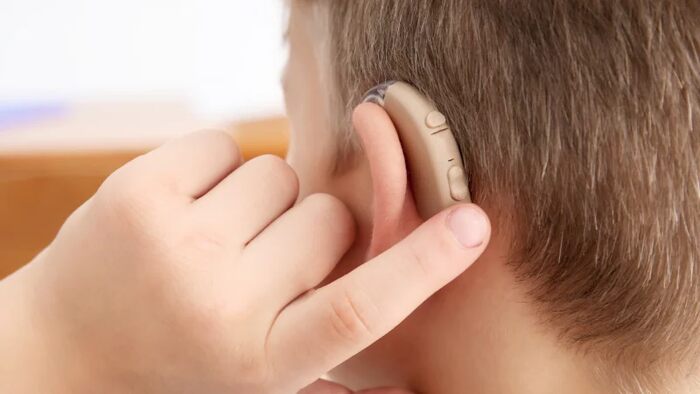
Give any new setting a few hours before deciding it is wrong. Sounds that feel jarring at first, like rustling paper or your own footsteps, often fade into the background once your brain adjusts. According to the National Council on Aging, this adjustment period is completely normal. It typically improves within the first few weeks of consistent wear.
Keep notes on which settings work best in which places, especially if you use an app that saves custom profiles. Over a few weeks, you will build a small library of go-to levels for home, work, and noisy public spaces. Many current apps, including the MyPhonak app, let you save and label these presets. Switching between them then takes only a moment.
Related Hearing Health Guides
Once your loudness settings feel right, a few other basics round out your daily routine. Our guide on how to put a hearing aid in your ear covers proper insertion. Our guide on how to clean a hearing aid earmold explains how to keep the seal free of wax buildup.
If you are still choosing a device, see our guide on how to select a hearing aid. Our guide on what level of hearing loss requires a hearing aid can help if you are unsure of your degree of loss. Our guide on how to measure hearing aid domes is worth a look if whistling or fit issues persist.
Frequently Asked Questions
Why won’t my hearing aid volume go any higher?
Most devices cap the maximum level to protect your ears from further damage. If you consistently need more, talk to your audiologist about reprogramming your settings.
How do I adjust the volume on my Phonak hearing aid?
Press the button on the device, or use the slider inside the MyPhonak app if your model is app-controlled. Each press or drag is usually confirmed with a beep or on-screen change.
Can I adjust each ear separately?
Yes, with dial systems and most apps. Single buttons and rocker switches usually change both ears together.
Is it normal for my hearing aid to sound different every day?
Background noise changes constantly, so minor differences are expected. A significant or sudden change is worth mentioning to your audiologist.
What should I do if I can’t figure out how to adjust hearing aid volume on my specific model?
Check the manual that came with your device, or contact the manufacturer’s support line. Your audiologist can also walk you through it during a follow-up visit.
Does raising the volume drain the battery faster?
Slightly, yes. Higher amplification uses more power, so very loud settings for long stretches can shorten daily battery life.
My hearing aid whistles when I turn it up. Is that normal?
No. Whistling usually means a poor seal rather than a normal side effect of a higher setting. Have your audiologist check the fit.
Can a family member accidentally change my settings?
It is possible with exposed buttons or an unlocked app. Some apps offer a lock feature, which is worth using if this is a concern.
Will my audiologist need to reset my settings if I change them too much?
Not usually. Most devices keep your original baseline program stored, so an audiologist can simply restore it during your next visit if your manual adjustments have drifted too far.
Bottom Line
Learning how to adjust hearing aid volume comes down to knowing your control type. From there, it’s a matter of practicing the motion until it feels automatic. Buttons, rocker switches, and dials each use a slightly different technique, while apps offer the most precise control of all. Treat a sudden need for much higher levels as a signal to check in with your audiologist, not just a setting to push through. With a little practice, dialing in the right sound for any room becomes second nature.

Hi, I’m Mamon, the content creator behind this blog. I share my experience in blogging, WordPress, SEO, and affiliate marketing through honest product reviews, in-depth buying guides, and practical how-to articles. Every piece of content is thoroughly researched and written to help readers make informed decisions.
Leave a Reply