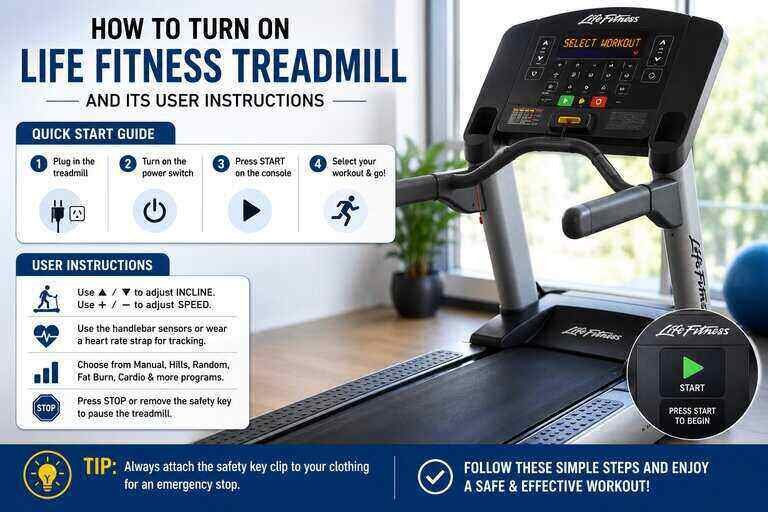
Learning how to turn on Life Fitness treadmill controls takes only a minute once you know where the controls live. Life Fitness machines are common in commercial gyms and home setups alike. Their startup sequence is simple once it’s broken down step by step. This guide covers the full process, from the first power switch to your first Quick Start workout. It also walks through the available workout modes and the maintenance habits worth knowing.
Key Takeaways
- Starting the treadmill involves three separate components. These are the main power switch, the magnetic safety key, and the console’s Quick Start controls.
- The safety key clips to your clothing and must stay attached while you walk, jog, or run.
- Quick Start buttons like WALK, JOG, or RUN launch a preset-speed workout instantly, without programming anything first.
- Life Fitness treadmills run on standard household AC power, not batteries. There’s no motor battery to replace or maintain.
- Manual mode, Quick Start programs, and built-in workouts each serve a different training purpose.
Three Components You Need to Know First
Before you learn how to turn on life fitness treadmill equipment step by step, know that three separate parts are involved. It’s not just one power button. The main ON/OFF switch sits at the base of the frame, near where the power cord plugs in. The magnetic safety key is a small clip-on device connected to a cord. It attaches to your clothing as an emergency stop feature and is a separate component from the console entirely. The console’s Quick Start section is where you actually launch a workout once the machine is powered on. Confusing these three parts is the most common reason people think their treadmill “won’t turn on,” when it’s actually working fine.
How to Turn On Life Fitness Treadmill Units: Step by Step
Once you know what each control does, starting the machine is straightforward.
- Plug the power cord into a nearby outlet.
- Flip the ON/OFF switch at the base of the frame to the “I” (on) position.
- Attach the magnetic safety key’s clip to your clothing before you step onto the belt.
- Wait a few seconds for the console to boot up and display the home screen.
- Steady yourself with a firm footing on either side of the belt, not on top of it, before starting.
At this point, the console is live and ready for you to choose how you actually want to work out.
Using the Quick Start Controls
Once the console is on, the fastest way to start moving is the Quick Start section. Most Life Fitness treadmills label these WALK, JOG, and RUN. Each one launches an instant workout at a preset speed, typically around 3.0, 5.0, and 7.0 mph. Press whichever matches your intended pace, and the belt begins moving within a few seconds. If you’d rather set your own pace instead, use the speed arrows near the display to dial in a custom number. Start around 0.5 to 1 mph and increase gradually from there.
Setting Up Your Workout
Beyond speed, a few other settings shape your session. Incline adjusts with its own set of buttons near the display, letting you add resistance without changing your pace. Duration works the same way. Select a preset time or program before starting, or let the console run until you manually stop it. If you’re new to the machine, 10 to 15 minutes is a reasonable starting goal. You can extend that once you’re comfortable with how the belt and console respond.
Types of Workouts Available on a Life Fitness Treadmill
Three main workout styles cover most training goals.
Manual Mode
Manual mode hands you full control over speed and pace throughout the session. It works well for runners who want to set their own intervals rather than follow a preset structure.
Quick Start Programs
These preset workouts, described above, get you moving instantly at a fixed pace. Many consoles also let you save custom programs for repeat use. This is useful if you follow the same routine several times a week.
Built-in Workouts
Professionally designed interval programs push speed or incline automatically throughout the session. These tend to be more demanding. They suit users who already have a base level of fitness rather than complete beginners.
Watch: Life Fitness Treadmill Quick Start Tutorial
This video walks through the Quick Start process on the console. It pairs well with the step-by-step instructions above.
Connecting to Life Fitness On Demand Classes
Many Life Fitness consoles support On Demand, a library of streamed and on-screen workout classes. According to Life Fitness’s own getting started guide, a stable internet connection of at least 2.5 Mbps is recommended for smooth playback. Connect your console to Wi-Fi through the settings menu, then sign into your account. Select a class from the library once your treadmill is already powered on and ready to move.
Using a Heart Rate Monitor While You Train
A heart rate monitor pairs naturally with a Life Fitness treadmill. This holds true whether you’re using the built-in hand sensors or a separate chest strap or wrist device. Staying within a target heart rate zone helps you get more consistent training results and avoid overexertion during longer sessions. According to Cleveland Clinic’s guide to heart rate zones, most moderate-intensity cardio falls between 64% and 76% of your estimated maximum heart rate. Checking your zone periodically during a workout is a simple way to keep your effort level appropriate for your goals.
Maintenance Tips to Keep It Running Smoothly
A little regular upkeep keeps the treadmill reliable for years.
- Wipe it down after each session. Sweat and dust build up on the frame and handles quickly. A clean cloth with mild soap and water handles most of it.
- Lubricate the belt periodically. Use a lubricant made for treadmill belts to keep it gliding smoothly under the deck. These lubricants are available from Life Fitness or most fitness retailers.
- Check the safety key regularly. A worn or damaged cord can fail to trigger the emergency stop when it should. Replace it if the clip or cord looks frayed.
- Keep the power cord and outlet clear. Life Fitness treadmills draw power directly from a standard household circuit rather than an internal battery. A stable outlet connection matters more than anything else for reliable startup.
Life Fitness Treadmill Models: What to Expect at Startup
Life Fitness sells several console families, and knowing which one you own makes the power-on process even more predictable. The Activate Series, common in newer home and light-commercial setups, uses a simplified console. It has large touch buttons and the same WALK/JOG/RUN Quick Start layout described above. The Integrity and Platinum Series, found more often in club settings, add a full touchscreen with entertainment and workout-tracking features. Still, the underlying ON/OFF switch, safety key, and Quick Start sequence work the same way across every model. Club Series machines, typically found in commercial gyms, sometimes route power through a shared circuit breaker for the row of equipment. If a single unit won’t power on, check whether the whole row lost power first. Regardless of which console you’re facing, the fundamentals of how to turn on life fitness treadmill equipment stay consistent. Plug in, flip the switch, attach the key, and choose a workout.
Troubleshooting Common Startup Problems
Most people searching for how to turn on life fitness treadmill fixes are dealing with one of the same three components covered earlier. It’s rarely a deeper mechanical fault. If the console stays completely dark, confirm the outlet itself has power by plugging in another device. Then check that the ON/OFF switch at the base is firmly in the “I” position. A console that lights up but won’t let you start a workout almost always means the safety key isn’t fully seated. Remove it and reinsert it firmly until it clicks into place. If the belt starts but immediately stops, check that the key’s cord isn’t pulled taut or caught on the frame. Even a slight tug can trigger the emergency stop. For error codes on the display, most Life Fitness manuals list a short troubleshooting table specific to that model. Keeping the original manual or a downloaded PDF copy on hand can save a service call for a simple fix. When none of these steps resolve the issue, contact Life Fitness support instead of opening the housing yourself.
Related Treadmill Guides
Curious how your treadmill’s running costs stack up? Our guide on how much electricity a treadmill uses covers that. If you’re comparing models, our guide on how much a treadmill weighs can help you plan for space and moving day. Tracking your workouts more closely? See our guide on accurate heart rate monitors for device recommendations.
Frequently Asked Questions
Why won’t my Life Fitness treadmill turn on?
Check all three components. Confirm the power cord and outlet are working. Also check the ON/OFF switch at the base and confirm the safety key is seated.
What does the safety key actually do?
It’s a magnetic emergency stop clip. Pulling it out, whether intentionally or from a fall, immediately stops the belt.
Does a Life Fitness treadmill need a special outlet?
Most residential models run on a standard 120-volt household outlet in the U.S. Commercial models may have different requirements, so check your specific manual.
How fast should a beginner start?
Around 0.5 to 1 mph is a comfortable starting point. Increase gradually as your comfort and balance improve.
What’s the difference between Quick Start and Manual mode?
Quick Start launches an instant workout at a preset speed. Manual mode lets you set and adjust your own speed and incline throughout the session.
Do I need internet access to use the treadmill?
No. Internet is only needed for On Demand classes and streaming content. The console and manual workouts function without a connection.
How often should I lubricate the belt?
This varies by usage and model, so check your owner’s manual. Many owners lubricate every three to six months under regular use.
Can I use a Life Fitness treadmill without the safety key?
No. The console typically won’t start a workout without the key properly inserted, since it’s a core safety feature.
Is it normal for the console to take a few seconds to boot up?
Yes. A short delay after powering on is normal while the console loads. It’s not a sign of a malfunction.
What should I check first if I can’t figure out how to turn on life fitness treadmill controls?
Start with the outlet and power cord, then the ON/OFF switch, then the safety key. Nearly every startup issue traces back to one of those three components rather than a deeper fault.
Can I move a Life Fitness treadmill without unplugging it first?
No. Always power off and unplug the treadmill before moving or cleaning underneath it. This protects both your safety and the cord and console.
Bottom Line
Once you understand how to turn on life fitness treadmill controls, from the power switch to the safety key to the Quick Start buttons, the rest of the machine is easy. Pick Manual mode, a Quick Start program, or a built-in workout depending on your goals. Keep up with basic cleaning and lubrication, and the treadmill should serve you reliably for years.

Hi, I’m Mamon, the content creator behind this blog. I share my experience in blogging, WordPress, SEO, and affiliate marketing through honest product reviews, in-depth buying guides, and practical how-to articles. Every piece of content is thoroughly researched and written to help readers make informed decisions.
Leave a Reply